

A Chatbot Answers the What for Free. A Good Presentation Puts Your Face, Voice and Judgment in the Room.
Written By: Tom Ogg, Co-Founder and Co-Owner – Travel Professional NEWS

Some years ago I wrote that the future of online travel presentations would belong to virtual reality, embedded 3D models and Leap Motion controllers that let a speaker wave a hand and spin a cruise ship on screen. I was genuinely excited about it. If one of those controllers is still sitting in your desk drawer because of me, keep it; someday it will make a nice museum piece.
What actually transformed presentations was quieter and far more useful. Nobody is gesturing at holograms. Instead, a travel advisor can type three sentences into an app and get back a finished slide deck, speaker notes included, before the coffee finishes brewing. That is the real story, and it changes what today’s travel professional should be worried about.
What I Got Right, and What Nobody Saw Coming
The core argument I made back then has held up well. Online presentations give a niche specialist global reach. They keep working long after the live event ends. They build credibility faster than nearly any other marketing a home based advisor can afford. All three of those points are still true; if anything, they are truer now.
What I got wrong was the bottleneck. I assumed the challenge would be delivery technology: better cameras, fancier interfaces, more immersive formats. In practice, the challenge for most advisors was production. Building a decent deck ate a weekend. Editing a video took longer. Writing a script that did not sound like a supplier brochure took longest of all. So a lot of advisors did one webinar, collapsed on the couch, and never did a second.
AI has flattened that bottleneck. Meanwhile, some of the platforms I once recommended have quietly left the stage. Microsoft retired Skype in 2025, and Facebook Messenger Rooms disappeared before that. Zoom itself has rearranged its AI lineup: on June 1, 2026, Zoom retired the standalone “AI Companion” brand name in favor of “Zoom AI” for its built in features and “ZoomMate” for a new paid agentic product. If you are still teaching new advisors from a list of tools written in 2019, it is time for a fresh list.
Why Presentations Matter More Now That Travelers Have Chatbots
Here is the irony. The same technology that makes presentations easy to produce also makes it easier for travelers to skip the advisor entirely. Plenty of consumers now ask a chatbot to sketch a Danube itinerary or compare two cruise lines before they ever talk to a human being.
My observation, after a long time in this business: when a machine can answer the “what” for free, the advisor’s value shifts to the “who.” Who has stood on that pier in the rain? Who knows which cabin category sits under the lido deck and its 6 a.m. furniture dragging? Who has an opinion and is willing to share it? A chatbot can summarize a destination. It cannot look a nervous first time cruiser in the eye and tell them they are going to love it.
That is exactly what a good online presentation delivers. It puts your face, your voice and your judgment in front of a prospect before they ever call you. In a market crowded with AI generated sameness, a real person with real expertise stands out more than ever.
There is a search angle too. A presentation that lives online with a clean transcript becomes content that both people and AI search tools can find and reference. A deck that lives only on your laptop does nothing for you at 2 a.m.
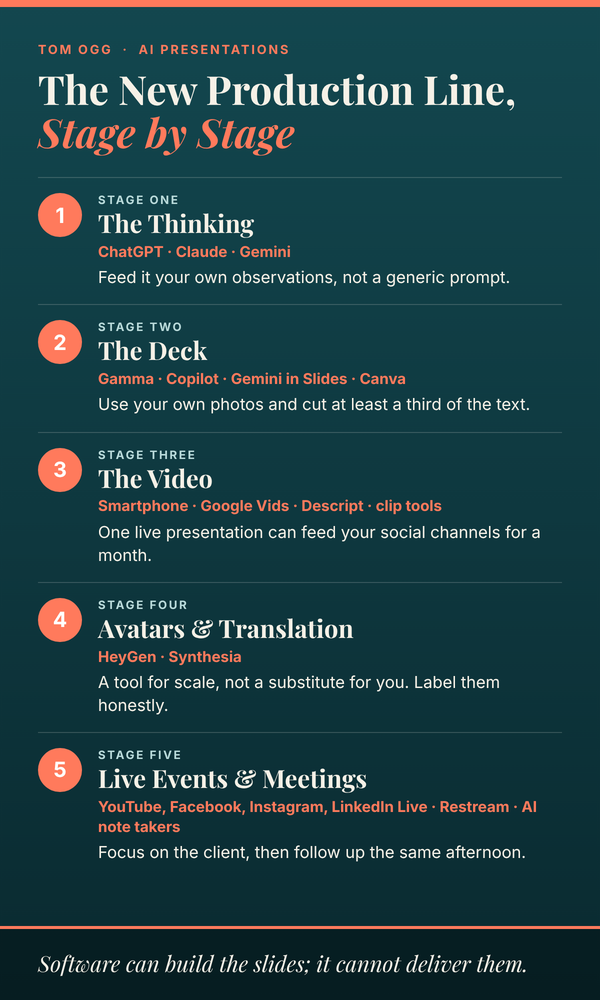
The New Production Line, Stage by Stage
Rather than list every app on the market (they change monthly), think about the presentation as a production line and use AI where it saves the most time.
Stage One: The Thinking
Start with a general AI assistant such as ChatGPT, Claude or Gemini. Feed it your raw material: the questions clients actually ask you, your notes from a fam trip, your opinions about which river cruise lines suit which travelers. Ask it to organize that into an outline, draft an opening that names the audience’s problem, and suggest a closing call to action.
The key word is your. Ask an AI to “write a webinar about Alaska cruises” and you will get the same presentation as every other advisor who typed that sentence. Give it your own observations and it becomes an organizer and editor for knowledge only you have.
Stage Two: The Deck
Dedicated AI presentation builders now generate entire decks from a prompt or an outline. Gamma is the name that comes up most often in 2026 reviews, and many people draft in Gamma and export to PowerPoint only when a client requires the format. If you already live inside Microsoft 365, Copilot works directly in PowerPoint, though it requires a Microsoft 365 Copilot add-on. Google Slides users have Gemini built in, and Canva has its own AI design features. We use Gamma all the time and it makes the task of presentation design and creation a cinch.
Whichever you choose, treat the first draft as a rough sketch. Replace stock imagery with your own photos wherever possible, and cut at least a third of the text. AI loves bullet points the way cruise passengers love the buffet: enthusiastically and without restraint.
Stage Three: The Video
Your smartphone is still a perfectly good studio. What has changed is everything around it. Google Vids, for example, now offers a read along teleprompter that scrolls automatically as you speak and a transcript trim tool that lets you edit video by deleting words or silences straight from the transcript, and those features were opened to all users in early 2026. As of September 23, 2026, anyone with a Google account can generate AI video inside Google Vids in 1080p at no cost, and videos can be published directly to YouTube from within Vids.
Descript popularized the same idea of editing video like a document, and short clip tools can cut a 45 minute webinar into a dozen social media snippets. That last point matters: one live presentation can now feed your social channels for a month.
The animated whiteboard explainer, which once required hiring a freelancer on Fiverr, can now be roughed out with AI video tools. For anything carrying your brand, though, a skilled human animator still produces better results.
Stage Four: Avatars and Translation (Handle With Care)
AI avatar platforms such as HeyGen and Synthesia can turn a script into a talking presenter, or clone your own likeness and voice. The genuinely useful feature for travel is translation: HeyGen’s translation produces lip synced dubbing of an existing video rather than generating a new one from a script. A specialist in Mexico weddings could reach Spanish speaking families with the same presentation, in their language, without reshooting.
My caution: an avatar is a tool for scale, not a substitute for you. Travelers buy from people they trust. If a prospect discovers that the friendly expert in your video was never actually in the room, you have spent credibility you may not get back. Use avatars for translated versions and routine explainers, label them honestly, and keep your real face on the content that sells.
Stage Five: Live Events and Meetings
Live presentations still carry an energy that recorded content cannot match. YouTube Live, Facebook Live, Instagram Live and LinkedIn Live remain the obvious stages, and multistreaming services like Restream let you broadcast to several at once.
For client consultations and small group webinars, AI note takers are the quiet hero. Zoom, Microsoft Teams with Copilot and Google Meet with Gemini can all produce meeting summaries, and Zoom now automatically breaks recordings into chapters and highlights. That means you can focus on the client instead of scribbling notes, then send a follow up email the same afternoon that reflects exactly what they told you about their anniversary trip.
The Rules AI Cannot Follow for You
Here is the part of my original advice that has not aged a day. Software can build the slides; it cannot deliver them. These principles still separate presentations people remember from the ones they leave running in another browser tab.
Respect the clock. Start on time, every time. Waiting “five more minutes for late arrivals” punishes the people who showed up as promised, and they are your most motivated audience. End on time too.
Win the first two minutes. At a conversational pace, two minutes is roughly 250 to 300 words. Spend them naming the problem your audience has and promising to solve it. Ask your AI assistant to draft five different openings, then pick the one that sounds like you.
Skip the résumé. Nothing drains a room faster than a speaker reciting credentials. Let your expertise show through the content. If a host is introducing you, ask them to keep it to one sentence.
Know exactly who is watching. AI is a real help here. Ask registrants a question or two when they sign up, then have an AI tool summarize the answers so you know whether you are talking to honeymooners, retirees or family reunion planners before you begin.
Dress for the audience, and check your frame. The old advice about matching your attire to your audience still applies; a business suit for a surf travel webinar is as wrong as flip flops for a corporate group. Today, add your background, lighting and audio to that checklist. A blurred background is better than a pile of laundry.
Own the last two minutes. Close with one clear call to action: what you want viewers to do, why and how. In 2026, that means a QR code on screen, a booking link in the chat and a calendar link for a consultation. Make the next step frictionless.
Guardrails Every Advisor Needs
AI is a remarkable assistant and a terrible fact checker. A few rules worth adopting now:
- Verify every fact. AI tools will confidently invent fares, port times and visa requirements. Check anything specific against supplier sources before it goes on a slide.
- Watch your images. An AI generated photo of a ship or resort that does not exactly match reality is a misrepresentation waiting to become a complaint. Use supplier media within their usage rules, or your own photos.
- Get consent before recording. Tell participants when an AI note taker or recording is running.
- Protect client data. Do not paste client names, passport details or payment information into AI tools that have not been approved by your host agency or business.
- Be honest about avatars. If it is not you on screen, say so.
A Tuesday Morning, Rebuilt
To make this concrete, here is an illustrative workflow for a river cruise specialist preparing a webinar on first time European river cruising.
She spends twenty minutes dictating her opinions into an AI assistant: which lines suit active travelers, what surprises first timers, why she prefers spring sailings. The assistant turns that into an outline. She pastes the outline into an AI deck builder, then spends an hour swapping in her own photos and trimming text. On Thursday she presents live, with an AI note taker capturing attendee questions. By Friday, a clip tool has cut the recording into short videos for social media, the full version is on YouTube with a transcript, and a Spanish version narrated in her own cloned voice is in progress, clearly labeled.
Total production time: a fraction of what one webinar used to cost her. The parts that sold the cruises, her opinions and her presence, were hers alone.
What to Do This Month
Pick one niche topic your clients ask about constantly. Build one presentation using AI for the outline and the deck. Deliver it live, record it, and repurpose it into at least five short clips. Then measure what happened: consultations booked, email signups, questions asked.
The technology I predicted years ago never really arrived. The technology that did arrive turned out to be better, because it gave advisors back the one resource we never have enough of: time. Spend that time where no machine can follow you, in front of your clients, being the expert they cannot find anywhere else.